The Mac-hine
A neighbour ‘wakaf’-ed an old Mac Pro (mid 2010 model) for the surau’s use. Unable to think of a way to utilise a Mac device, an obsolete one at that, for the surau, is how, and why, I ended up installing Windows 10 on a Mac Pro.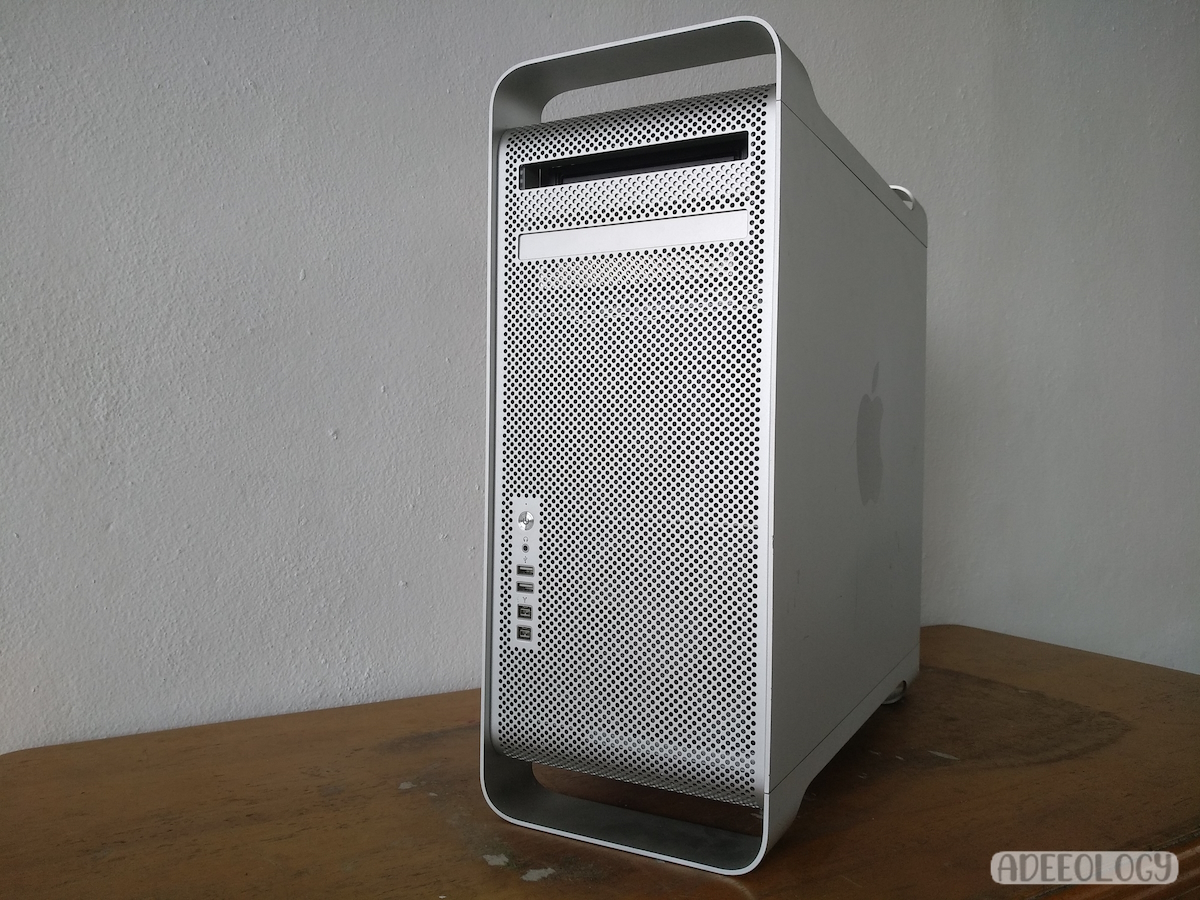 This Mac was hardly used, and is highly specced out. I underestimated its value when it was new, by half. According to this website, it was sold for a princely sum of RM16K, in 2011. Even now, a working Mac Pro of this specifications, or even its parts, would command a pretty sum.
Powering it up, I found out the hefty 18 kg(!) Mac was last used in 2019. I’m limited to the guest account though, and I wasn’t in the business of scrounging through documents, so I set out to install Windows 10 on it, using one of the three hard disks installed in it.
The Issues
The Mac ran macOS High Sierra 10.13.6, and was updated to the MP51.88Z.0084.B00.1708080528528 firmware (dated 8th August 2017). The computer was last booted up in 2019, and had three 1 TB drives, one of which was a Crucial SSD, and two Western Digital Caviar Black mechanical drives.


Took me some time to figure out how to take off the side panel, and more time to figure out how to slide out the processor tray. Pleasantly suprised to see it was a dual socket tray, but I can’t take the heatsinks off, as I need a T Handle Hex Key type screwdriver.
The processors are Intel Xeon X5650 “Westmere”. One of the processors is running hotter than the other, about 6-7 °C higher. The cooler one idles at 45 °C-ish, and the GPU would idle at 50 °C-ish.
Six out of of eight of the RAM slots were populated, each with 2GB sticks for a total of 12GB. There were SK Hynix DDR3 ECC RAM, what kind, model, I’m unable to confirm. Cosmetic wise, it’s still a pretty thing to look at despite its age (and some expected scuffs), but the missing DVD cover is giving me the impression of a toothless grin.


The graphic card is an ATI Radeon HD 5870 Mac Edition. It’s a single fan cooler card, with an extra long backplate unique to the Mac universe, of which the logic for the extra long backplate will be made clear as we go along.


Scouring Mac-centric forums, I found out it was possible to install Windows 10, or even Windows 11 (but no thanks) in a dual boot setup (with Boot Camp). It’s actually possible to have a standalone Windows install, with some caveats. Brigadier drivers were required, and installing Windows could actually screw up the boot ROM.
Technical Specifications
| Product Name | Mac Pro (Mid 2010) |
| Processing | Two Intel Xeon X5650 “Westmere” processors
|
| Systemboard | Mac-F221BEC8 motherboard
|
| Connections and audio |
|
| Graphics and displays | ATI Radeon HD 5870 Mac Edition
|
| Memory |
|
| Communications |
|
| Storage | Four 3.5-inch cable-free, direct-attach drive bays with built-in independent 3Gb/s Serial ATA channels; four internal drive carriers included Using Western Digital Caviar Black WD1001FALS-41Y6A1 for Windows 10 install.
|
| Optical Drive | 18x SuperDrive with double-layer support (DVD±R DL/DVD±RW/CD-RW)
|
| Dimensions | 51.1 cm x 20.6 cm x 47.5 cm |
| Weight | 18.1 kg – 18.7 kg |
Disassembly and Windows Installation
 The engineering is awesome! I love just how thick the aluminium case is. More than a decade has passed since its inception, and it still looks fresh. A timeless beauty indeed.
Beauty aside, in my limited experience with the Mac-world, I’ve always been fascinated with Apple’s engineering. I’ve repaired (or tried to) several, mostly obsolete MacBook Pros, and seen the insides of iPhones, and it always amazes me, how well designed Apple’s products are. Flawed as it is for being elitist, pricey and closed off, one can hardly find fault with their design philosophy. Every lines, every contours is, just perfection and complements the product even more.
What amazes me more, is how functional the design of Mac Pro is. Take the side panel latch design for starters. The position of the latch would move some horizontal notches inside the case. In its closed position, the notch would show red markings, meaning it’s in a locked position and you can never put the side panel back on.


The removeable drive sleds are labelled. The extra long GPU backplate, surpasses the card’s length considerably. As such, it’s practically lying on its side, so no GPU sag here. The card is secured in its PCIE slot, and anchored at both ends, the IO back plate (which is also conveniently secured with captive thumb screws), and the other end is anchored in a sled at the motherboard fan.
This fan throws air all over the motherboard, and its PCIE sleds for IO cards are all numbered. The daughterboard tray (for the CPU, or CPUs in this case) is removeable, and its handle has rounded edges for perfect slotting. Aesthetically pleasing is an understatement.


Enough ramblings about the cheese grater’s design. I decided to use one of the mechanical drives and formatted it in macOS. The Crucial SSD has macOS on it, and I’m leaving it untouched, in case the Windows install would fail. I created a bootable USB drive with the official Windows 10 22H2 ISO, and formatted the drive again during installation.
The Windows installation went smoothly, the firmware wasn’t affected. I’d like to think formatting the drive in macOS kept the firmware sane, and not bork up when I installed Windows. A couple of reboots, and updates, all the drivers were installed, except for the Bluetooth device. Some Googling led to this Apple Bluetooth driver from driveridentifier’s website. No, I don’t know how or why Syed Zainal Rashid’s mouse and trackpad got identified as the Bluetooth devices installed. All I care is that it works.


Windows on a Mac


Benchmarks


Conclusion
Running headless, this Windows Mac machine was set up to be controlled remotely, by this repurposed HP Compaq 6530B laptop. It is used as a streaming PC to broadcast the weekly ‘kuliah’ livestreams of our ‘surau’ via Restream. It’s also used to for file backups of the online media I made for the ‘surau’ via DeltaCopy, (a “Windows Friendly” wrapper around the Rsync program).
Useful Links
- Mac Pro Technical specifications.
- Install Windows 10 on an iMac without Bootcamp Assistant.
- The revived HP Compaq 6530B used to control this Mac Pro.




Be First to Comment